
Figwee Visual Food Diary
Bellwether Ideas LLCFood & Drink
3.225.00 Reviews
- Version
- 4.7
- Installs
- 10.00K
- Age Rating
- Everyone
Screenshots
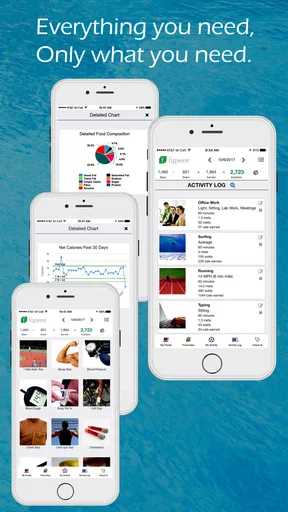
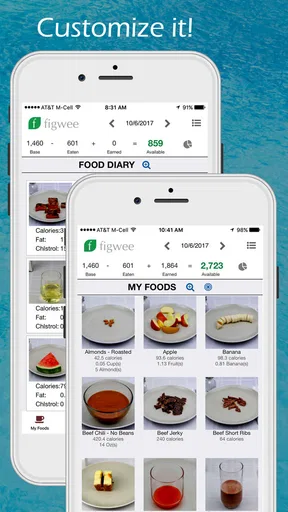
Our Review of Figwee Visual Food Diary
 Analysis by Appyee
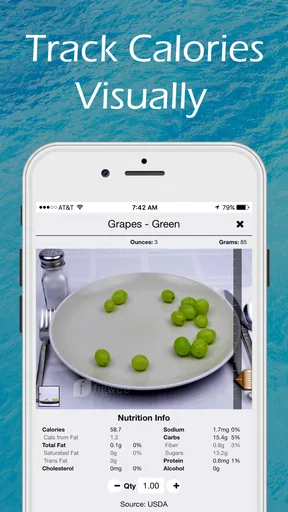
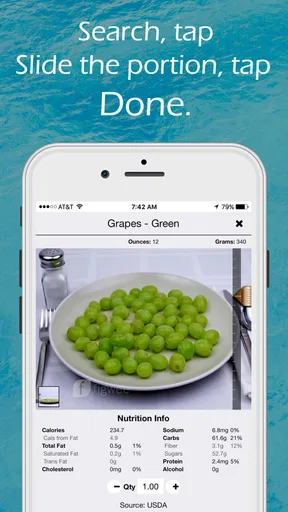
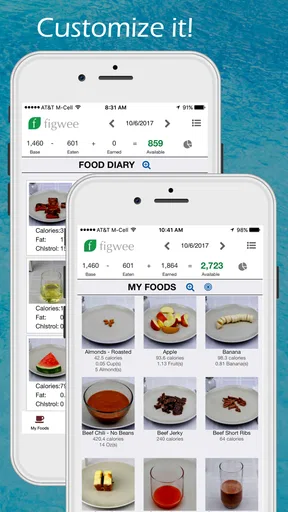
I found Figwee Visual Food Diary most useful when I stopped treating it like a formal nutrition program and started using it as a quick visual record of what I actually ate. The idea is simple: instead of building every meal from a long ingredient database, I can use a visual approach to estimate portions and keep a running calorie diary. That makes it feel less clinical than many calorie counters, although it also means I need to accept a degree of personal judgment.
Developed by Bellwether Ideas LLC, this free Food & Drink app is aimed at people who want more awareness around eating without turning every meal into a research project. It is available for Everyone, runs on devices using Android 6.0 or later, and the current version is 4.7. The app has passed 10K+ installs, with a 3.2 average from 78 ratings. Those figures suggest a small but established audience rather than a universally polished mainstream service, so I approached it as a focused tool with a particular style rather than a complete health platform.
How Figwee works in a real household
The most convincing use case for me is a shared household where people eat the same meals but want to track them separately. Imagine dinner is a bowl of pasta, a takeaway curry, or a plate assembled from whatever is already in the refrigerator. One person may want a rough calorie estimate, while another may simply want to notice patterns. A visual diary can make that first step faster than weighing every ingredient or searching through several matching database entries.
That convenience matters on busy evenings. If I have ten minutes before leaving for work, I am much more likely to record breakfast when the process feels visual and immediate. I can also use the same approach after a meal prepared by someone else, where I may not know the exact recipe. In that situation, the app is not giving me laboratory precision; it is helping me create a consistent estimate instead of forgetting the meal entirely.
For a couple or family using one phone, however, I would not treat the app as a shared journal. A food diary is personal, and calorie targets or eating habits can be sensitive. The practical boundary is to let each person use their own device and keep their entries separate. I would avoid passing one unlocked phone around at the table, especially if several people are trying to remember meals at once. The app is better suited to individual tracking than to a communal household log.
That distinction also prevents a common misunderstanding. The visual method can support conversation about meals, but it does not automatically coordinate a family’s shopping list, meal plan, or nutrition goals. If your main purpose is deciding what everyone should cook this week, a recipe planner or shared notes tool will be more appropriate. Figwee is strongest after the meal, when I want to record what happened, not when I am organizing the entire household.
What the visual approach changes
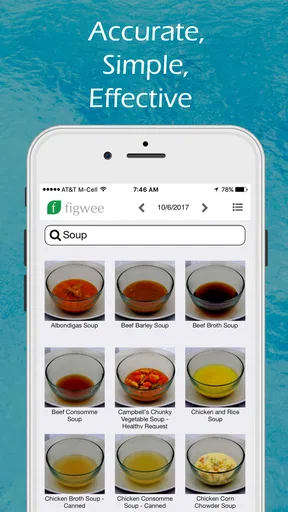
Traditional calorie counters often reward detailed searching. I choose a food, select a portion, adjust ingredients, and hope the database entry resembles what is on my plate. That can be useful for packaged foods with clear labels, but it becomes tiring with mixed dishes. Figwee’s visual emphasis changes the question from “Which exact database item is this?” to “What does this portion look like?”
I see that as both its main strength and its central trade-off. The visual route lowers friction, which makes regular recording more realistic. It can also expose portion size more clearly than a number alone. A serving that sounds small in text may look surprisingly substantial when compared with the food images. On the other hand, visual comparison cannot remove uncertainty from oil, sauces, restaurant recipes, or homemade meals.
My advice is to use the app consistently rather than chasing false accuracy. If I estimate a similar bowl of cereal in roughly the same way each morning, the diary can still reveal useful changes over time. If I switch between generous and cautious estimates depending on how I feel, the record becomes less useful. The hidden skill is not finding a perfect entry; it is building a repeatable habit.
This makes the app a better fit for awareness than for strict clinical tracking. Someone who must calculate nutrients precisely for a medical reason should use a method designed around verified labels, measured ingredients, and professional guidance. A visual estimate may be a helpful supplement, but I would not make it the only basis for a medically important decision.
Setting up personal boundaries before sharing a device
Because the app is free to download, it is easy to imagine installing it on a tablet kept in the kitchen. That can work for a single user, but a household should agree on whose diary is being recorded before using a shared screen. I would create a simple routine: one person records their food, checks that the entry belongs to them, and closes the app before the next person uses the device.
I would also avoid entering another person’s meals without their permission. Even when the intention is helpful, calorie information can quickly become judgmental. A parent, partner, or roommate may not want their portions monitored. The app can support self-directed awareness, but it should not become a silent reporting system inside the home.
There is another useful boundary around purchases. The app is free, but in-app items range from $3.99 to $7.99 each. Before anyone in a household buys an item, I would decide whether it is genuinely useful for that person’s routine and confirm who is responsible for the purchase. A free starting point makes experimentation easy, but shared-device use can blur who initiated an optional purchase.
I would also check the device itself before relying on the app during a busy routine. The minimum operating system is Android 6.0, so older phones may not be suitable. On a newer shared tablet, I would keep the user’s expectations realistic: installing the app does not turn the device into a multi-person nutrition station. The safest arrangement is still one account boundary per person, even if the physical device is shared.
Coordinating meals without turning the diary into supervision
In my experience, the best household workflow is cooperative but separate. One person can cook, another can record their own portion, and everyone can discuss the meal without comparing entries as if they were grades. For example, if I make a large pot of soup, each person can estimate the amount they ate independently. That preserves personal responsibility while still making the app useful around a shared dinner.
The visual method is particularly practical for meals served family-style. I can look at my bowl or plate and record the portion I took, rather than pretending the entire recipe was divided into identical servings. This is a non-obvious advantage: the person cooking does not need to know everyone’s exact portion for each diner to maintain a personal diary. It reduces the coordination burden that often makes detailed tracking collapse.
There is a trade-off when recipes vary. If the soup contains more cream one night or the stir-fry uses extra oil, a visual estimate may not capture the difference well. In those cases, I would make a private note of the unusual preparation and interpret the diary as an estimate. The point is not to make the household kitchen behave like a nutrition laboratory. It is to avoid losing the overall pattern because one meal was difficult to calculate.
For packed lunches, I would record the meal soon after preparing it rather than waiting until late at night. That creates a useful two-stage workflow: estimate the food while I can still see the portions, then review the day later. This is more reliable than trying to reconstruct every snack from memory. It also keeps the diary from becoming a stressful end-of-day chore.
When several people are tracking, I would not compare totals automatically. A teenager, an adult with a different routine, and an older relative may have completely different needs. The app can be a private reflection tool for each person, while meal coordination happens through ordinary conversation. That separation is important because the app’s value falls sharply if people feel watched rather than supported.
Age, trust, and responsible use
The Everyone content rating makes the app broadly accessible, but accessibility is not the same as suitability for every goal. I would be comfortable introducing the visual diary as a way to learn about portions and eating patterns, but I would be careful with children and adolescents. Calorie counting can affect people differently, and younger users may interpret a number as a judgment about whether they have eaten “well” or “badly.”
With a child, I would focus on regular meals, variety, and listening to hunger rather than setting a numerical target. I would not use the app to police snacks or demand that a young person show every entry. If a family is concerned about weight, growth, or eating behavior, a qualified health professional should guide the conversation. The app may be present on the device, but it should not replace that support.
Trust matters just as much between adults. A partner may ask me to help estimate a restaurant meal, but that is different from checking their diary without asking. Since this is a personal food record, I think the default should be privacy and consent. Shared use works when people choose to exchange practical tips, not when one household member becomes the other’s calorie auditor.
I also appreciate that the app’s simple premise leaves room for a less obsessive routine. I can use it for several days to understand my normal portions, then decide whether continued tracking is useful. I do not have to make it the center of every meal. That makes it more approachable for someone who wants a short period of observation rather than a permanent nutrition project.
Where it beats ordinary calorie counters
Compared with a conventional database-heavy calorie counter, Figwee’s biggest advantage is speed when the food is visually obvious but difficult to describe precisely. A plate of mixed leftovers, a serving of fruit, or a homemade sandwich may be easier to estimate from appearance than to reconstruct through multiple searches. This can make the habit more sustainable for people who abandon detailed apps after a few days.
It also suits users who think in portions rather than nutrients. If my immediate question is whether I am routinely serving myself oversized bowls, a visual diary can answer that more naturally than a long list of micronutrients. The app’s design direction keeps attention on the plate, which is often where the practical behavior happens.
Usual alternatives are stronger when precision and breadth matter more. A database-focused tracker is generally the better choice for barcode-based packaged foods, exact recipe calculations, macro targets, or a detailed nutrition plan. A meal-planning app is better for coordinating ingredients and cooking schedules. A spreadsheet may even be preferable for someone who wants complete control over custom formulas. Choosing Figwee means choosing ease and visual estimation over exhaustive detail.
The average rating of 3.2 reflects a mixed reception, and I think that is fair context for a careful download decision. The app has a defined concept, but a focused concept will not satisfy everyone. If I expect a polished all-in-one health platform, I am likely to be disappointed. If I want a lightweight visual record and accept estimation, the experience makes more sense.
Small habits that make the diary more useful
My first practical tip is to record ordinary meals, not only impressive healthy ones. A diary filled with idealized entries tells me very little about my routine. The useful information comes from the rushed breakfast, the extra serving at dinner, and the snack eaten while cooking. Figwee works best when I let it reflect real behavior without trying to make the record look virtuous.
Second, I would use familiar visual references. The same bowl, plate, or lunch container can act as a private measuring aid. I do not need to weigh everything to become more consistent; I can learn what half a bowl or a full plate looks like in my own kitchen. This is especially helpful for shared meals, where the recipe stays constant but each person serves a different amount.
Third, I would review patterns weekly rather than reacting to one entry. One restaurant meal or unusually large dessert does not explain my overall routine. Looking back across several ordinary days can show whether the issue is portion size, frequent snacking, skipped meals, or simply inconsistent recording. The visual format is most valuable when it helps me ask better questions, not when it encourages punishment for a single choice.
Finally, I would decide in advance when precision is worth the effort. For a packaged lunch with a clear label, an exact database entry may be more sensible. For a shared homemade casserole, a consistent visual estimate may be enough. That hybrid approach prevents me from forcing every food into the same workflow and is, in my view, the most practical way to use this app.
Who should use it and who should skip it
I would recommend Figwee to someone who repeatedly starts calorie tracking and quits because searching and measuring become exhausting. It is also a good match for a person who wants to understand portions, a busy household cook who serves variable amounts, or an adult who prefers a visual record to a nutrient dashboard. The free entry point makes it reasonable to try without committing to a subscription-style routine.
I would be more cautious recommending it to anyone who needs medically precise nutrition totals, detailed macro management, or reliable recipe-level calculations. I would also skip it as a family surveillance tool. The app can help each person notice their own habits, but it should not be used to pressure a partner, monitor a child, or settle arguments about who ate what.
People who dislike estimating may also find the visual approach frustrating. The same flexibility that makes it quick can feel vague when two similar-looking dishes have very different ingredients. In that case, a more conventional tracker with measured recipes and verified labels will probably feel more trustworthy, even if it takes longer to use.
My household verdict
After using it as a personal diary rather than a family control panel, I see Figwee as a practical middle ground. It is less demanding than a meticulous calorie database and more concrete than relying on memory. Its visual focus can make portion awareness easier during shared meals, but the responsibility for interpretation remains with me. That is both its appeal and its limitation.
The developer, Bellwether Ideas LLC, has built an app with a clear purpose rather than an overloaded collection of health features. I like that clarity, especially for short-term awareness or everyday portion tracking. I would keep account boundaries personal, discuss household meals without comparing private totals, and treat any estimate as an estimate.
My recommendation is simple: choose Figwee when consistency matters more than perfect precision. It is free to begin, rated for Everyone, and has enough of a user base to be more than an abandoned experiment. Just do not expect it to replace a clinical nutrition tool, a recipe calculator, or a shared meal planner. For the right person, it turns the question “What did I really eat today?” into a manageable habit without making every meal feel like paperwork.
Verdict
Strengths of Figwee Visual Food Diary
- Quickly logs meals using photos instead of lengthy descriptions.
- Visual history makes eating patterns easy to recognize over time.
- Simple interface is approachable for beginners and casual users.
- Useful for tracking portions and meal variety without calorie counting.
- Photo-based records can help support conversations with a nutritionist.
Limitations of Figwee Visual Food Diary
- Food photos may not accurately show ingredients or portion sizes.
- Requires consistent photo-taking to keep the diary useful.
- Limited detail for users needing precise calorie or nutrient tracking.
- Meal images can consume noticeable storage space over time.
- Privacy may concern users who prefer not to store personal food photos.
Similar Picks in This Category
View All
Rappi: Food Delivery, Grocery
Rappi, Inc - Delivery3.5

McDonald’s: Cupons e Delivery
Arcos Dorados4.3

Swiggy: Food Instamart Dineout
Swiggy4.7

Blinkit: Groceries & more
Blinkit4.8

foodpanda: food & groceries
Foodpanda GmbH a subsidiary of Delivery Hero SE4.0

Zomato: Food Delivery & Dining
Zomato4.7
Frequently Asked Questions
What is Figwee Visual Food Diary and how does it work?
Figwee Visual Food Diary is a food-tracking app designed to make logging meals more visual and intuitive. Instead of relying only on text searches or weighing every ingredient, you can compare your portion with realistic food images and record what you ate. This approach can make daily tracking faster, especially for users who find traditional calorie-counting apps complicated or time-consuming.
Does Figwee provide accurate calorie and nutrition information?
Figwee offers estimated calorie and nutritional information based on the food and portion you select, but the results should not be treated as laboratory measurements. Actual values can change depending on ingredients, cooking methods, brand differences, and serving size. The visual comparisons are useful for consistent tracking, although users with strict medical or dietary requirements should verify information with a qualified professional.
Do I need a kitchen scale to use Figwee?
No, a kitchen scale is not required to use Figwee Visual Food Diary. The app is built around visual portion comparisons, allowing you to choose an image that most closely matches the amount you consumed. A scale may improve precision for certain foods, particularly calorie-dense ingredients, but the visual method is convenient for everyday logging when weighing meals is impractical.
Is Figwee suitable for weight loss or special diets?
Figwee can support weight-loss goals by helping you become more aware of portions, calories, and eating habits over time. It may also be useful for people following general nutrition plans, provided the available food information matches their needs. However, it is not a substitute for personalized medical advice, and users managing diabetes, allergies, eating disorders, or other conditions should consult a healthcare professional.
Is Figwee Visual Food Diary free to download, and are there in-app purchases?
The app’s availability, included features, and pricing may vary depending on your device, region, and the current version listed in the App Store or Google Play. Some features may require a purchase or subscription, so it is worth reviewing the store description before downloading. Also check the latest privacy details and permissions to understand how diary entries and related data are handled.
